
Actions
An action does something in the Hub. The app has 44 of them. Actions that find a record are on Searches; a Zap usually finds first and acts second.
Rules every action follows
Inputs. Required inputs come first. A candidate is always chosen with a Find button or mapped from an earlier step, never typed as an id. Courses, locations, sessions, interview and appraisal types and reference templates are dropdowns. There is no dropdown of all your candidates: listing every name and email into the Zap editor would be too much personal data and too many calls.
Dates and times. A date is the UK calendar day, a time is
HH:MM in 24 hour UK time, and a filter moment is ISO 8601. A bad value is refused before anything is sent, and the message says Nothing was sent to Hub.Blank never overwrites. In the Update actions, a field you leave empty is not sent, so it keeps its value in the Hub. The price of this is that an Update action cannot clear a value.
The Hub decides. Anything the Hub decides, such as who pays for a course group, the app cannot override.
Scopes first. An action checks the key's scopes before it calls the Hub and names the missing one: This step needs the scope … Add it to the key on the Hub Developer page, then reconnect.
Outputs are an allowlist. An action returns a fixed list of fields. A field the Hub adds later is not passed on until the app is changed, and a list of what is never passed on is on Data protection.
Errors say what happened in plain words and end with
Reference: and a Hub request id. Quote the reference to support. See Troubleshooting.Safe to repeat (idempotency)
When an action creates something and the Hub documents it as repeatable, the app sends an Idempotency-Key:
zap- followed by a code made from your connection, the step and the exact inputs. If Zapier runs the step again with the same inputs, for example after a network error, the Hub answers with the first result instead of doing it twice, and the output says Replayed From an Earlier Identical Run is true. The Hub keeps the first answer for 24 hours.Zapier gives a step no run number, so two different runs with identical inputs inside 24 hours also share a key. The second run gets the first answer and does not act again. That is usually what you want (the same candidate is not added twice, the same renewal not charged twice). If you do need to act twice with identical inputs, change one input, such as a reference field. The column Marks below says which actions are Safe to repeat.
If the same key is sent with different inputs the Hub refuses: This run was already sent with different inputs, so Hub refused it.
Actions that spend credits or money
Three actions can take credits or money from your balance. They are labelled
[Spends credits] and follow the same four rules:Action | Cap input | What the cap means | Confirmation tick |
|---|---|---|---|
Start Training Access | Maximum Credits (required) | The most the start may take from your credits. A number, decimals allowed. | I understand this spends credits or creates a payment link |
Approve Renewal | Maximum Credits (required) | The most the renewal may take from your credits. | I understand this spends credits |
Request Training Verification | Maximum Price in Pounds (Before VAT) (required) | The most the verification may cost, in pounds before VAT (it is the net price on this call), not credits. | I understand this spends credits |
- A cap is required. A blank, negative or non-numeric cap stops the step before any request: "Maximum Credits" is required for this step: it is the most the step may spend. Use 0 to allow only free requests. Nothing was sent to Hub. A cap above 1,000,000 is refused. 0 is allowed and lets only free requests through.
- The tick is required. If it is not ticked the step stops: Tick "I understand this spends credits" to run this step. Nothing was sent to Hub.
- A price above the cap charges nothing. The Hub answers
409 quote_changed, the step stops and shows the live quote. For credits: The price changed above your maximum: it now needs 8 credits, the balance is 5, the balance does not cover it. Nothing was charged. Raise "Maximum Credits" if you accept the new price. For a verification: The price changed above your maximum: it now costs £6.00 before VAT, £7.20 with VAT. Nothing was stored or charged. Raise the maximum price (pounds, before VAT) if you accept the new price. Examples are shown with made-up figures.
- Not enough credits. Not enough credits. 5 needed, 2 available. Nothing was charged.
The cap is part of the idempotency fingerprint, so changing the cap makes a new request.
Ask for daily caps before you loop. A Zap that loops can spend credits quickly. The Hub can apply a daily cap to a key (a cap on credits per day and a cap on access starts per day), but these are off unless Hub staff switch them on, so ask support to set them before you turn on a Zap that spends credits in a loop. When a daily cap is reached the step stops with The daily cap on credits this key may spend is reached, so nothing was charged or started (or …access starts for this key…), and retrying that day cannot help.
Start Training Access in detail. The Hub decides who pays each course group. Groups your account pays are charged to your credits at once. Groups the candidate pays create a one-time payment link, and nothing is started for them until it is paid. There is no input to change who pays. The link is only output if you tick Include Payment Link: it lets whoever holds it pay, and Zapier would keep it in Zap history and pass it to the next app. The groups to start are given as numbers from Find Training Access; leave Course Groups empty to start every group that needs access now. Months (12 or 24) applies only to groups the candidate pays for. If the account has no card payments set up, the message is Card payments are not set up for this account, so no payment link was created and nothing was started.
Request Training Verification in detail. It never starts a card payment. A free automatic request takes nothing; a charged request takes one verification credit or its price from your balance, once. The certificate is a file from an earlier step: the app fetches it (an https address, up to 10 MB) and sends it to the Hub. The result arrives later: use the Training Verification triggers or Find Training Verification.
Assign Courses can also charge credits when your account charges at assignment (usually nothing). It has no cap, because the Hub gives it none, so read the result field Credits Charged. In Add mode (the default) the candidate keeps their courses and the ones you choose are added; in Replace mode they end up with exactly the courses you choose and you must tick I understand Replace removes every course not in the list.
Actions that cannot be undone
Seven actions are labelled
[Destructive] in the Zap editor: Withdraw Booking Invitation, Cancel Practical Training Booking, Cancel Virtual BLS Booking, Cancel Interview Booking, Cancel Reference Request, Stop Monitoring Registration and Cancel Training Verification. Each says in its description that it cannot be undone and needs a ticked I understand this cannot be undone; without it the step stops and sends nothing. A cancelled booking may refund by the Hub's own cancellation rules, and the result says what was paid back. The Hub has no way to delete a candidate, so the app has no such action.Actions that email a person
An action that makes the Hub email or text a person says so in its description, and Marks says Emails a person. They are: Create Candidate (the activation email, unless Active is set to No), Send Training Reminder Email, Request Renewal (emails your agency), Invite Candidate to Book, Create Reference Request, Add Referee to Request, Remind Referee, Remind Referees of Request, Reschedule Virtual BLS Booking, Reschedule Interview Booking and Create Appraisal Booking. Several other booking actions also trigger Hub emails (the booking, cancellation and reschedule notices). In a sandbox no email or text is ever sent. On the live Hub they are real.
Booking actions: holds and the place taken
Create Practical Training Booking, Create Virtual BLS Booking and Create Interview Booking do three things in one step: hold the place, book it with the hold, and release the hold if the booking is refused for good. They are safe to repeat.
Someone else took the place: Someone else took that place; pick another session. Nothing was booked or charged. The hold is released.
You already hold a place (the Hub allows one open hold for an account): Zapier is asked to try again in 30 seconds.
The Hub is busy or throttling you (a 429 or a 5xx): the hold is kept so that Zapier's retry uses it.
Too many holds (the Hub's limits
too_fast, client_limit or ip_limit): the run is stopped and not retried, with Hub's limits on holding places stopped this… Nothing was booked or charged. Spread the runs out or release holds that are no longer needed.How It Is Paid decides what is charged. Booking credits and booking balance are taken now; a payment link, when one is created, is returned as Payment URL.
Booking questions are entered as JSON text until the Hub offers a call that lists them.
Create Appraisal Booking has no hold.
The balance actions
Eight actions have no input. They are actions called Get … and not searches, because Zapier requires a search to have at least one search field. Five give credit balances (Online Training, Practical Training, Virtual BLS, Interview, Appraisal), one the Training Verification balance, and two the public booking page address for Practical Training and for Virtual BLS (a Hub page address, neither secret nor one-time).
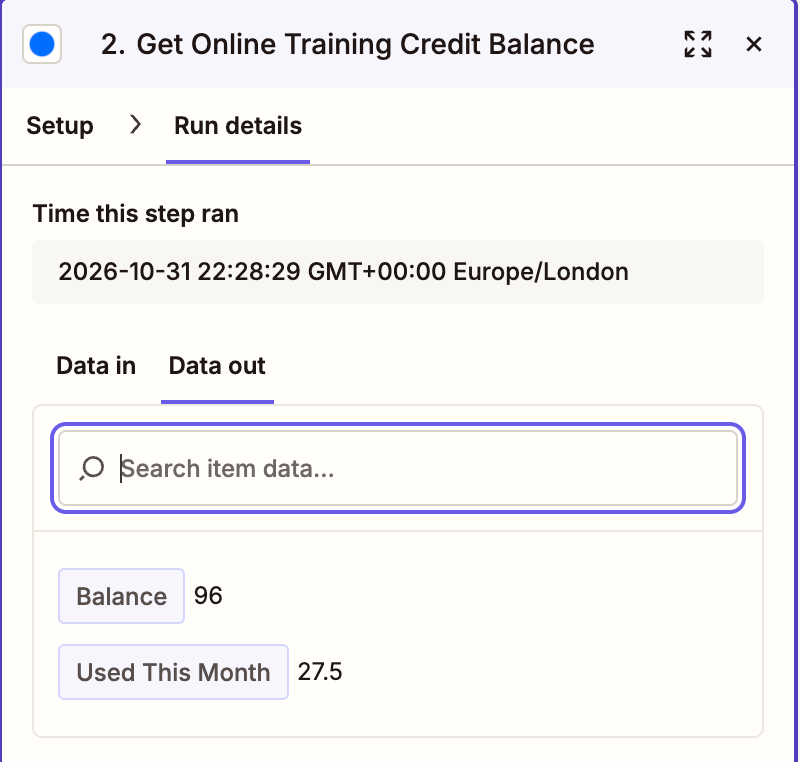
Credits are units, not money, and can be fractions such as 10.5. Money is shown in whole pence with a
currency, for example Booking Balance Pence.The 44 actions
In the tables, Returns lists the first fields of the result; there are more in Zapier's field list. Every result also has an ID field that Zapier uses. Optional lists the inputs you may leave empty.
Hub (core) (2)
Action | What it does | You must give | Optional | Returns | Marks | Scope it needs |
|---|---|---|---|---|---|---|
Create Candidate | Adds a candidate to Hub. | First Name, Last Name, Email | Phone, Roles, Specialties, Active, Candidate Reference, Compliance Officer | Candidate Reference, First Name, Last Name, Name, Email, Roles and 14 more | Emails a person; Safe to repeat | hub:candidates:write |
Update Candidate | Changes a candidate in Hub. | Candidate | First Name, Last Name, Email, Phone, Roles, Specialties and 3 more | Candidate Reference, First Name, Last Name, Name, Email, Roles and 14 more | None | hub:candidates:write |
Online Training (8)
Action | What it does | You must give | Optional | Returns | Marks | Scope it needs |
|---|---|---|---|---|---|---|
Start Training Access [Spends credits] | Starts a candidate's access to the course groups that need it. | Candidate, Maximum Credits, a confirmation tick | Course Groups, Months, Include Payment Link | Candidate Reference, Outcome, Credits Charged, Balance After, Groups Group ID, Groups Title and 7 more | Spends credits (cap and tick required); Safe to repeat | online-training:access:write |
Get Training Certificate | Gets a candidate's combined training certificate as a PDF file that later steps can attach or save. | Candidate | Certificate Type, From Date, To Date, Course | Candidate Reference, Certificate, File Name, Content Type | None | online-training:certificates:read |
Assign Courses | Assigns Online Training courses to a candidate. | Candidate, Courses | Who Pays, Renewal Mode, Send Renewal Reminders, Send Activation Email, Mode | Candidate Reference, Added Course Ids, Removed Course Ids, Credits Charged, Candidate Candidate Reference, Candidate First Name and 7 more | None | online-training:candidates:write |
Send Training Reminder Email | Emails the candidate a reminder through Hub, as the Send Reminder buttons in Hub do. | Candidate, Reminder Type | None | Email Type, Message, Incomplete Courses | Emails a person; Safe to repeat | online-training:emails:write |
Approve Renewal [Spends credits] | Approves a candidate's manual renewal. | Candidate, Maximum Credits, a confirmation tick | None | Candidate Reference, Status, Source, Requested At, Approved At, Declined At and 2 more | Spends credits (cap and tick required); Safe to repeat | online-training:renewals:write |
Decline Renewal | Declines a candidate's open renewal request. | Candidate | Reason | Candidate Reference, Status, Source, Requested At, Approved At, Declined At and 2 more | Safe to repeat | online-training:renewals:write |
Request Renewal | Asks, on the candidate's behalf, for their manual renewal to be approved. | Candidate | None | Candidate Reference, Status, Source, Requested At, Approved At, Declined At and 2 more | Emails a person; Safe to repeat | online-training:renewals:write |
Get Online Training Credit Balance | Gets the Online Training credit balance your account can spend and the credits used this month. | Nothing | None | Balance, Used This Month | None | online-training:credits:read |
Practical Training (7)
Action | What it does | You must give | Optional | Returns | Marks | Scope it needs |
|---|---|---|---|---|---|---|
Invite Candidate to Book | Invites a candidate to book a practical training place that your account pays for. | Candidate | Contact Name, Contact Email | Candidate Reference, Candidate Name, Status, Course ID, Contact Name, Contact Email and 3 more | Emails a person; Safe to repeat | practical-training:bookings:write |
Withdraw Booking Invitation [Destructive] | Withdraws a booking invitation: the candidate's link stops working at once and the invitation leaves the list. | Invitation, a confirmation tick | None | Withdrawn | Destructive (tick required) | practical-training:bookings:write |
Get Practical Training Booking Link | Gets the public booking page address you can give candidates so they book a practical training place themselves. | Nothing | None | Booking URL | None | practical-training:account:read |
Create Practical Training Booking | Books a candidate onto a practical training session. | Candidate, How It Is Paid, Agency Contact Name, Agency Contact Email, Session | Agency Email | Candidate Reference, Candidate Name, Course ID, Course Name, Location ID, Location Name and 21 more | Safe to repeat | practical-training:bookings:write, practical-training:holds:write |
Cancel Practical Training Booking [Destructive] | Cancels a practical training booking and releases the seat. | Booking, a confirmation tick | None | Candidate Reference, Candidate Name, Course ID, Course Name, Location ID, Location Name and 20 more | Destructive (tick required) | practical-training:bookings:write |
Get Practical Training Booking Certificate | Gets the attendance certificate of a booking as a PDF file that later steps can attach or save. | Booking | None | Booking, Certificate, File Name, Content Type | None | practical-training:bookings:read |
Get Practical Training Credit Balance | Gets what your account can spend on practical training bookings: the booking credits left for each course (places, which can be fractions) and the booking money balance in pence. | Nothing | None | Booking Credits Course ID, Booking Credits Course Name, Booking Credits Credits, Booking Balance Pence, Currency | None | practical-training:credits:read |
Registration Monitoring (6)
Action | What it does | You must give | Optional | Returns | Marks | Scope it needs |
|---|---|---|---|---|---|---|
Acknowledge Registration Alert | Marks a registration alert as acknowledged in Hub, so it stops asking for a person. | Alert | None | Type, Type Label, Severity, Title, Previous Status, New Status and 8 more | None | registration-monitoring:alerts:write |
Add Registration to Monitor | Adds a professional registration for Hub to check against the regulator's register. | First Name, Last Name, Email, Regulator, Registration Number, Consent Given | Phone, Date of Birth, Profession, Compliance Officer, Monitoring Start Date, Notes and 1 more | Candidate Reference, First Name, Last Name, Email, Profession, Regulator and 12 more | Safe to repeat | registration-monitoring:workers:write |
Update Monitored Registration | Changes a monitored registration. | Monitored Registration | First Name, Last Name, Email, Phone, Date of Birth, Profession and 4 more | Candidate Reference, First Name, Last Name, Email, Profession, Regulator and 12 more | None | registration-monitoring:workers:write |
Stop Monitoring Registration [Destructive] | Stops monitoring a registration and removes it from Hub. | Monitored Registration, a confirmation tick | None | Deleted | Destructive (tick required) | registration-monitoring:workers:write |
Change Monitoring Settings | Changes how often a registration is checked, when monitoring starts, or switches monitoring off or on. | Monitored Registration | Check Frequency, Monitoring Start Date, Monitored | Is Active, Monitoring Start Date, Registration Check Frequency, Registration Next Check Due At | None | registration-monitoring:workers:write |
Check Registration Now | Asks Hub to check one registration against the regulator now, outside its schedule. | Monitored Registration | None | Job ID, Track, Status | Safe to repeat | registration-monitoring:verification:write |
References (6)
Action | What it does | You must give | Optional | Returns | Marks | Scope it needs |
|---|---|---|---|---|---|---|
Remind Referee | Sends one referee a reminder email with their link. | Referee UUID | None | Sent, Reminder Count | Emails a person | references:requests:write |
Create Reference Request | Creates a reference request for a candidate. | Candidate, Collection Mode | Template, References Required, Expiry (Days), Notes, Referees | UUID, Candidate Reference, Candidate Name, Candidate Email, Template ID, Template Name and 19 more | Emails a person; Safe to repeat | references:requests:write |
Cancel Reference Request [Destructive] | Cancels a reference request you no longer need. | Reference Request, a confirmation tick | None | UUID, Candidate Reference, Candidate Name, Candidate Email, Template ID, Template Name and 19 more | Destructive (tick required) | references:requests:write |
Extend Reference Request | Gives referees more time. | Reference Request, Days to Add | None | UUID, Candidate Reference, Candidate Name, Candidate Email, Template ID, Template Name and 19 more | None | references:requests:write |
Add Referee to Request | Adds one referee to a reference request. | Reference Request, Referee Name, Referee Email, Referee Organisation, Referee Position | Referee Phone, Relationship to Candidate | UUID, Name, Organisation, Position, Status, Status Label and 4 more | Emails a person; Safe to repeat | references:requests:write |
Remind Referees of Request | Sends a reminder email to every referee of a request who is due one. | Reference Request | None | Reminders Sent, Skipped Referee, Skipped Reason | Emails a person | references:requests:write |
Virtual BLS (6)
Action | What it does | You must give | Optional | Returns | Marks | Scope it needs |
|---|---|---|---|---|---|---|
Get Virtual BLS Booking Link | Gets the public booking page address you can give candidates so they book Virtual BLS training themselves. | Nothing | None | Booking URL | None | virtual-bls-training:account:read |
Create Virtual BLS Booking | Books a candidate onto a Virtual BLS timeslot. | Candidate, Kit Address, Kit City, Kit Postcode, How It Is Paid, Agency Contact Name, Agency Contact Email, Course, Date, Time | Agency Email, Booking Questions (JSON) | Candidate Reference, Candidate Name, Course ID, Course Name, Start Date, End Date and 15 more | Safe to repeat | virtual-bls-training:bookings:write, virtual-bls-training:holds:write |
Cancel Virtual BLS Booking [Destructive] | Cancels a Virtual BLS booking. | Booking, a confirmation tick | None | Candidate Reference, Candidate Name, Course ID, Course Name, Start Date, End Date and 14 more | Destructive (tick required) | virtual-bls-training:bookings:write |
Get Virtual BLS Booking Certificate | Gets the certificate of a Virtual BLS booking as a PDF file that later steps can attach or save. | Booking | None | Booking, Certificate, File Name, Content Type | None | virtual-bls-training:bookings:read |
Reschedule Virtual BLS Booking | Moves a Virtual BLS booking to a new free timeslot. | Booking, New Date, New Time | None | Candidate Reference, Candidate Name, Course ID, Course Name, Start Date, End Date and 14 more | Emails a person | virtual-bls-training:bookings:write |
Get Virtual BLS Credit Balance | Gets what your account can spend on Virtual BLS bookings: booking credits left for each course and the booking money balance in pence. | Nothing | None | Booking Credits Course ID, Booking Credits Course Name, Booking Credits Credits, Booking Balance Pence, Currency | None | virtual-bls-training:credits:read |
Clinical Interviews (4)
Action | What it does | You must give | Optional | Returns | Marks | Scope it needs |
|---|---|---|---|---|---|---|
Create Interview Booking | Books a candidate onto a clinical interview timeslot. | Candidate, How It Is Paid, Agency Contact Name, Agency Contact Email, Interview Type, Date, Time | Phone, Job Role, NMC Number, Nursing Band, Agency Email, Copy Emails To and 1 more | Candidate Reference, Candidate Name, Candidate Email, Job Role, Interview Type ID, Interview Type Name and 17 more | Safe to repeat | clinical-interviews:bookings:write, clinical-interviews:holds:write |
Cancel Interview Booking [Destructive] | Cancels a clinical interview booking. | Interview Booking, a confirmation tick | None | Candidate Reference, Candidate Name, Candidate Email, Job Role, Interview Type ID, Interview Type Name and 17 more | Destructive (tick required) | clinical-interviews:bookings:write |
Reschedule Interview Booking | Moves a clinical interview booking to a new free timeslot. | Interview Booking, New Date, New Time | None | Candidate Reference, Candidate Name, Candidate Email, Job Role, Interview Type ID, Interview Type Name and 17 more | Emails a person; Safe to repeat | clinical-interviews:bookings:write |
Get Interview Credit Balance | Gets what your account can spend on clinical interview bookings: credits for each interview type, credits shared across groups of types, credits for all types, and the booking money balance in pence. | Nothing | None | Booking Credits Interview Type ID, Booking Credits Interview Type Name, Booking Credits Credits, Interview Type Group Credits Pool, Interview Type Group Credits Name, Interview Type Group Credits Credits and 3 more | None | clinical-interviews:credits:read |
Clinical Appraisals (2)
Action | What it does | You must give | Optional | Returns | Marks | Scope it needs |
|---|---|---|---|---|---|---|
Create Appraisal Booking | Books a candidate for a clinical appraisal (held as a video call). | Appraisal Type, Candidate, How It Is Paid, Agency Contact Name, Agency Contact Email, Candidate Knows It Is a Video Call, Candidate Knows to Show Photo ID | Phone, Job Role, NMC Number, Agency Email | Candidate Reference, Candidate Name, Candidate Email, Job Role, Appraisal Type ID, Appraisal Type Name and 13 more | Emails a person; Safe to repeat | clinical-appraisals:bookings:write |
Get Appraisal Credit Balance | Gets what your account can spend on clinical appraisal bookings: credits for each appraisal type and the booking money balance in pence. | Nothing | None | Booking Credits Appraisal Type ID, Booking Credits Appraisal Type Name, Booking Credits Credits, Booking Money Balance Pence, Currency | None | clinical-appraisals:credits:read |
Training Verification (3)
Action | What it does | You must give | Optional | Returns | Marks | Scope it needs |
|---|---|---|---|---|---|---|
Get Verification Balance | Gets what your account can spend on training verifications: the money balance in pence, automatic and manual verification credits, and the older balance. | Nothing | None | Money Pence, Auto Credits, Manual Credits, Legacy Balance Pence, Currency | None | training-verification:read |
Request Training Verification [Spends credits] | Submits a training certificate to Hub for verification. | Request Type, Candidate Name, Candidate Email, Agency Name on Certificate, Certificate, Maximum Price in Pounds (Before VAT), a confirmation tick | Notify Email, Candidate, Your Reference, File Name | Client Reference, Request Type, Status, Candidate Name, Candidate Email, Agency Name On Cert and 15 more | Spends credits (cap and tick required); Safe to repeat | training-verification:write |
Cancel Training Verification [Destructive] | Cancels a verification that has not been processed yet and refunds its charge to where it came from. | Verification, a confirmation tick | None | Client Reference, Request Type, Status, Candidate Name, Candidate Email, Agency Name On Cert and 15 more | Destructive (tick required) | training-verification:write |
Was this page helpful?