
Triggers
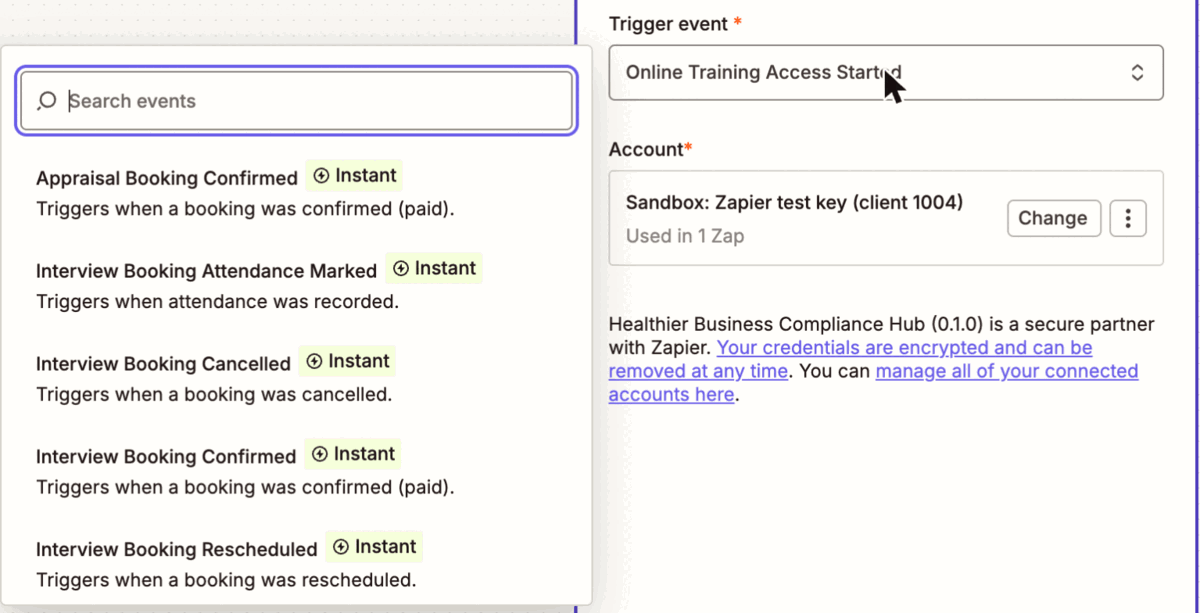
A trigger starts a Zap when something happens in the Hub. The app has 60 of them: 59 instant triggers, one for each Hub webhook event the app allows, and 1 polling trigger, New Candidate.
Instant and polling
The diagram shows the two ways a Zap hears about the Hub. In an instant trigger the Hub calls the Zap; in a polling trigger Zapier asks the Hub on a timer.
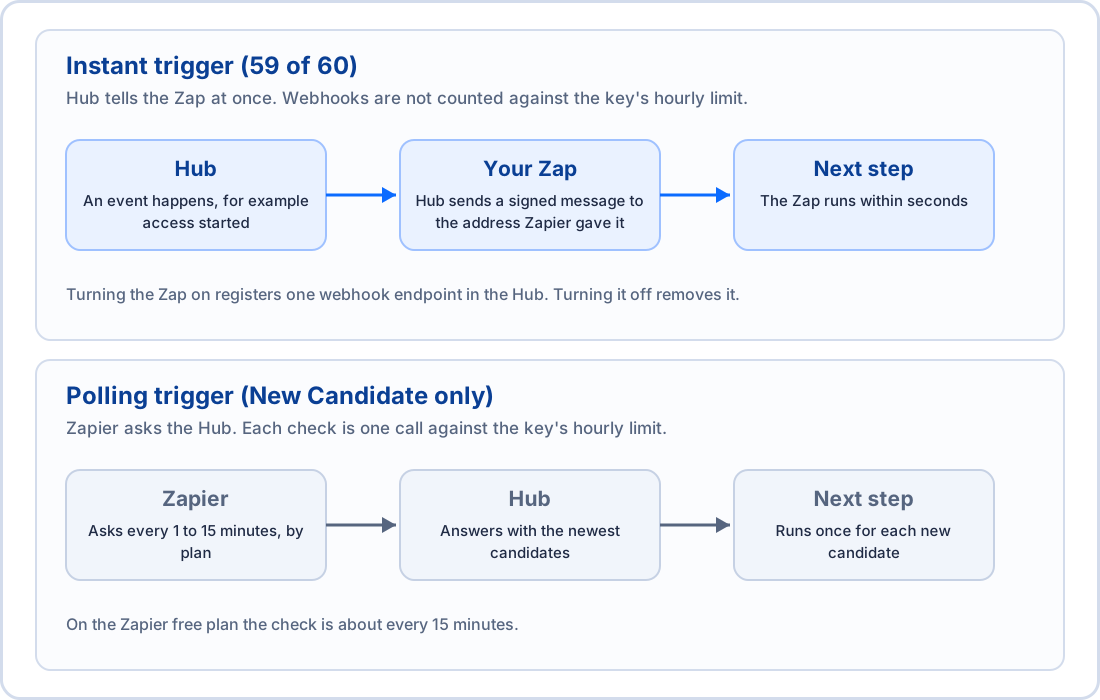
| Instant (59) | Polling (New Candidate) |
|---|---|---|
How the Zap hears | The Hub posts the event to the Zap | Zapier asks the Hub on a schedule |
Delay | Seconds | Up to the polling interval of your Zapier plan |
Cost against the key | None: webhooks do not count against the hourly limit | One call for every check |
What is registered in the Hub | One webhook endpoint for the Zap, with source zapier | Nothing |
When you turn the Zap off | The endpoint is removed | Nothing to remove |
Use an instant trigger whenever there is one. New Candidate polls only because the Hub has no event for a new candidate yet.
Zapier plan limits. What a Zap may do depends on your Zapier plan, which Zapier controls and can change, so check Zapier's own pages. At the time of writing, the free plan allows a Zap of two steps (a trigger and one action) and checks polling triggers about every 15 minutes; paid plans allow more steps and shorter intervals. Of the recipes on this site, three use two steps and one uses three. Prices are not given here.
Cost of polling. Every check is one call against the key's hourly limit (1,000 by default). A Zap that checks every minute uses 60 calls an hour, so ten polling Zaps on one key would use more than half the default limit. Give a polling Zap its own key, raise the limit if you need to, and prefer instant triggers.
What every instant trigger gives you
Every instant trigger returns the same four fields, then the fields of its event:
Field | Meaning |
|---|---|
ID and Event ID | The Hub's own id of this event. It is stable when the Hub delivers the event again, and Zapier uses it to avoid running a Zap twice for one event. Two different events about one booking are two runs. |
Event Type | The event name, for example online-training.access.started. |
Occurred At | When it happened, as a date and time. |
By default an event carries ids, statuses and dates only, as the Hub's webhooks do. A candidate or booking is named by its reference, not by name or email.
Include details
Most triggers (51 of 59) have a choice called Include details, which you find under Configure when you set up the trigger. When it is True, the app does one extra lookup in the Hub for each run, adds a block of fields called Details (names, emails, statuses and dates of the record) and marks every lookup in the Hub's log as coming from Zapier. When it is False or left empty, nothing extra is fetched.
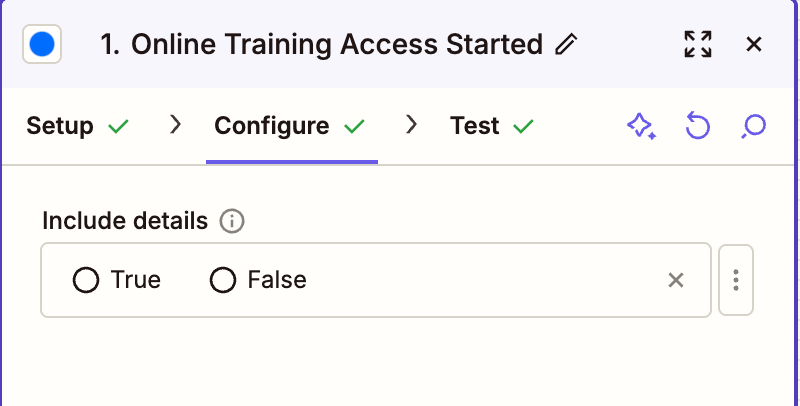
It costs one call against the key's hourly limit for every run.
It needs a read scope of the portal (shown in Scopes by step family), or the trigger refuses to turn on and names the scope.
Turn it on when a later step acts on the record, for example approves a renewal. Zapier cannot check that a message really came from the Hub (see Data protection), so a lookup makes the Hub the source of truth instead of the message.
A record that was deleted or is not allowed to be read does not lose the event: the run goes on and a field called
details_error says why (not_found or insufficient_scope). A lookup stopped by a rate limit makes the run fail so that Zapier tries it again.Details hold only a fixed list of fields. A phone number, date of birth, NMC number, address, notes or link is never in it.
Two triggers have a different choice or none:
Practical Training Booking Invite Sent has Include invite link. The link lets whoever holds it book, and Zapier keeps it in Zap history and hands it to the next app, so it is left out unless you tick this.
Account signals, such as a low balance, have no record to look up, so they have no Include details.
A test result
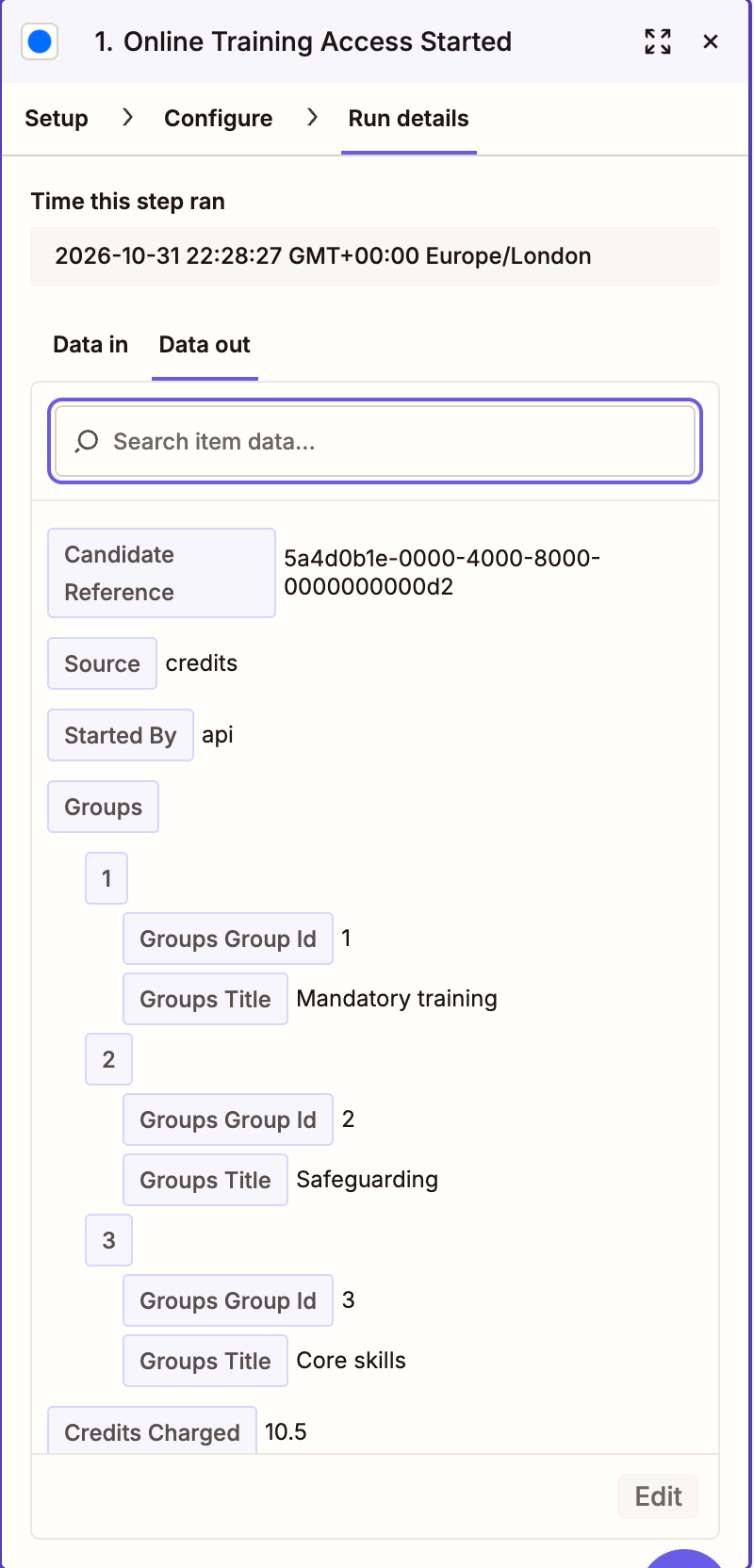
When you choose Test trigger Zapier shows an example. For an instant trigger it is the example in the Hub's own specification, not one of your records, so names and numbers in it are made up. In a sandbox you can raise a real event from the console (Simulate) or by acting in the Hub or through an action, and Zapier then shows that event.
How a trigger registers and ends
Turning the Zap on registers one webhook endpoint in the Hub, named
Zapier: and the trigger name, for the one event, with the source zapier, a reference that belongs to that Zap and a timeout of 15 seconds. Turning the same Zap on again does not make a second endpoint. The signing secret the Hub returns is thrown away, because Zapier cannot use it.Turning the Zap off removes the endpoint. A missing endpoint counts as removed.
An endpoint that fails 25 deliveries in a row is switched off by the Hub, and events during the outage are not queued. If a Zap stops firing, turn it off and on again, and check the endpoint on the Webhooks page.
The Hub tries each delivery up to five times over about 80 minutes.
The 60 triggers
There are no triggers for Occupational Health or DBS and Right To Work. The Hub has 73 events; the app uses 59 of them. The 14 it leaves out are the 9 Occupational Health events, the 3 DBS and Right To Work events, and the interview outcome and interview report events of Clinical Interviews.
In the tables, the sample is what Zapier shows when you test the trigger, in addition to the four fields above. Fields are shown with spaces instead of underscores. Include details says whether that choice is offered.
Hub (core) (1)
Trigger | Event | What it means | What the sample contains | Include details |
|---|---|---|---|---|
New Candidate | Polling (no event) | A new candidate was added in the Hub. Zapier checks on its polling schedule. | candidate ref, first name, last name, name, email, roles, candidate reference, compliance status, is active, next expiry date, added at, updated at | No |
Online Training (13)
Trigger | Event | What it means | What the sample contains | Include details |
|---|---|---|---|---|
Online Training Access Payment Link Expired | online-training.access.payment_link.expired | A candidate payment link expired unpaid. | candidate ref, payment id, groups | Yes |
Online Training Access Revoked | online-training.access.revoked | A candidate's training access was taken back (a refunded payment). | candidate ref, groups, reason | Yes |
Online Training Access Started | online-training.access.started | A candidate's training access was switched on (agency credits, free or candidate payment). | candidate ref, source, started by, groups, credits charged, access months, starts at, expires at, payment id | Yes |
Online Training Certificate Issued | online-training.certificate.issued | A combined training certificate was supplied for a candidate. | candidate ref, type, issued at | Yes |
Online Training Course Assigned | online-training.course.assigned | Courses were assigned to a candidate. | candidate ref, course ids, courses, assigned at | Yes |
Online Training Course Completed | online-training.course.completed | A candidate passed a course. | candidate ref, course id, course name, status, assigned at, completed at, expires at, grade | Yes |
Online Training Renewal Approved | online-training.renewal.approved | A candidate's manual renewal was approved and their access renewed. | candidate ref, request id, credits charged, expires at | Yes |
Online Training Renewal Declined | online-training.renewal.declined | A candidate's manual renewal request was declined. | candidate ref, request id, reason | Yes |
Online Training Renewal Requested | online-training.renewal.requested | A manual renewal was requested for a candidate (by the candidate, by you through the API or by an embed session). | candidate ref, request id, groups, credits needed, source | Yes |
Online Training Terms Accepted | online-training.terms.accepted | A candidate accepted the Hub terms, in the Hub or inside an embedded frame. | candidate ref, version, accepted at, via | Yes |
Online Training Training Completed | online-training.training.completed | A candidate completed all their assigned training. | candidate ref, status, courses assigned, courses completed, completed at, expires at | Yes |
Online Training Training Expired | online-training.training.expired | A candidate was sent a reminder that their training has expired. | candidate ref, status, expires at | Yes |
Online Training Training Expiring | online-training.training.expiring | A candidate was sent a reminder that their training is due for renewal. | candidate ref, status, expires at | Yes |
Practical Training (16)
Trigger | Event | What it means | What the sample contains | Include details |
|---|---|---|---|---|
New Practical Training Booking | practical-training.booking.created | A booking was created. | booking id, candidate ref, training event id, course id, course name, location name, start date, booking status, pay option | Yes |
Practical Training Balance Depleted | practical-training.balance.depleted | The booking balance ran out. | balance pence, currency | No (nothing to look up) |
Practical Training Balance Low | practical-training.balance.low | The booking balance is low. | balance pence, threshold pence, currency | No (nothing to look up) |
Practical Training Booking Attendance Marked | practical-training.booking.attendance_marked | Attendance was recorded on the last day. | booking id, candidate ref, training event id, course id, course name, location name, start date, booking status, pay option, attendance, attendance day | Yes |
Practical Training Booking Cancelled | practical-training.booking.cancelled | A booking was cancelled or refunded. | booking id, candidate ref, training event id, course id, course name, location name, start date, booking status, pay option, refund | Yes |
Practical Training Booking Certificate Available | practical-training.booking.certificate_available | A certificate is available. | booking id, candidate ref, training event id, course id, course name, location name, start date, booking status, pay option, attendance, attendance day | Yes |
Practical Training Booking Confirmed | practical-training.booking.confirmed | A booking was confirmed (paid). | booking id, candidate ref, training event id, course id, course name, location name, start date, booking status, pay option | Yes |
Practical Training Booking Invite Opened | practical-training.booking_invite.opened | A booking invitation was opened. | invite id, candidate ref, course id, course name | No (nothing to look up) |
Practical Training Booking Invite Sent | practical-training.booking_invite.sent | A booking invitation was sent. | invite id, candidate ref, course id | No. Option: Include invite link |
Practical Training Booking Invite Used | practical-training.booking_invite.used | A booking invitation was used to book. | invite id, candidate ref, course id, booking id, training event id, course name, start date | Yes |
Practical Training Booking No Show | practical-training.booking.no_show | A candidate did not attend. | booking id, candidate ref, training event id, course id, course name, location name, start date, booking status, pay option, attendance, attendance day | Yes |
Practical Training Booking Rescheduled | practical-training.booking.rescheduled | A booking was rescheduled. | booking id, candidate ref, training event id, course id, course name, location name, start date, booking status, pay option | Yes |
Practical Training Credits Depleted | practical-training.credits.depleted | A course ran out of credits. | course id, course name, credits | No (nothing to look up) |
Practical Training Credits Low | practical-training.credits.low | A course has few credits left. | course id, course name, credits, threshold | No (nothing to look up) |
Practical Training Slot Hold Expired | practical-training.slot_hold.expired | A held place expired. | hold hash, training event id, course name, location name, start date, expired at | No (nothing to look up) |
Practical Training Training Event Seats Low | practical-training.training_event.seats_low | A session is nearly full. | training event id, course name, location name, start date, remaining slots, threshold | No (nothing to look up) |
Registration Monitoring (2)
Trigger | Event | What it means | What the sample contains | Include details |
|---|---|---|---|---|
Registration Worker Initial Verification | registration-monitoring.worker.initial_verification | A worker registration was verified for the first time. | worker id, registration check id, regulator, registration number, status, checked at | Yes |
Registration Worker Status Changed | registration-monitoring.worker.status_changed | A worker registration status changed. | worker id, registration check id, regulator, registration number, previous status, new status, checked at | Yes |
References (7)
Trigger | Event | What it means | What the sample contains | Include details |
|---|---|---|---|---|
New Reference Reference Request | references.reference.request.created | A reference request was created. | uuid, candidate ref, collection mode, references required, expires at | Yes |
Reference Candidate Referees Submitted | references.candidate.referees.submitted | A candidate sent in the details of their referees. | reference request uuid, candidate ref, referees added | Yes |
Reference Reference All Completed | references.reference.all_completed | Every reference a request needs has been completed. | reference request uuid, candidate ref, references completed, references required | Yes |
Reference Reference Declined | references.reference.declined | A referee declined to give a reference. | reference uuid, reference request uuid, candidate ref, has decline reason | Yes |
Reference Reference Expired | references.reference.expired | A reference passed its deadline without an answer. | reference uuid, reference request uuid, candidate ref, expired at | Yes |
Reference Reference Reminder Sent | references.reference.reminder.sent | A reminder was sent to a referee. | reference uuid, reference request uuid, candidate ref, reminder number | Yes |
Reference Reference Submitted | references.reference.submitted | A referee submitted their reference. The answers and the score are not passed on. | reference uuid, reference request uuid, candidate ref, submitted at | Yes |
Virtual BLS (7)
Trigger | Event | What it means | What the sample contains | Include details |
|---|---|---|---|---|
New Virtual BLS Booking | virtual-bls-training.booking.created | A booking was created. | booking id, candidate ref, course id, course, start date, pay option, status | Yes |
Virtual BLS Booking Attendance Marked | virtual-bls-training.booking.attendance_marked | Attendance was recorded. | booking id, candidate ref, course id, course, start date, attendance, id checked | Yes |
Virtual BLS Booking Cancelled | virtual-bls-training.booking.cancelled | A booking was cancelled or refunded. | booking id, candidate ref, course id, course, start date, status | Yes |
Virtual BLS Booking Certificate Available | virtual-bls-training.booking.certificate_available | A certificate is available. | booking id, candidate ref, course id, course, start date | Yes |
Virtual BLS Booking Confirmed | virtual-bls-training.booking.confirmed | A booking was confirmed (paid). | booking id, candidate ref, course id, course, start date, pay status, transaction id | Yes |
Virtual BLS Booking Equipment Late | virtual-bls-training.booking.equipment_late | The training kit is overdue for return. | booking id, candidate ref, course id, course, start date, days overdue, notice number | Yes |
Virtual BLS Booking Rescheduled | virtual-bls-training.booking.rescheduled | A booking was rescheduled. | booking id, candidate ref, course id, course, start date, status | Yes |
Clinical Interviews (5)
Trigger | Event | What it means | What the sample contains | Include details |
|---|---|---|---|---|
Interview Booking Attendance Marked | clinical-interviews.booking.attendance_marked | Attendance was recorded. | booking id, candidate ref, interview type, start date, status, interview status, attendance, by | Yes |
Interview Booking Cancelled | clinical-interviews.booking.cancelled | A booking was cancelled. | booking id, candidate ref, interview type, start date, status, interview status, cancelled at, by | Yes |
Interview Booking Confirmed | clinical-interviews.booking.confirmed | A booking was confirmed (paid). | booking id, candidate ref, interview type, start date, status, interview status, pay status, transaction id, by | Yes |
Interview Booking Rescheduled | clinical-interviews.booking.rescheduled | A booking was rescheduled. | booking id, candidate ref, interview type, start date, status, interview status, previous start date, by | Yes |
New Interview Booking | clinical-interviews.booking.created | A booking was created. | booking id, candidate ref, interview type, start date, status, interview status, pay option, by | Yes |
Clinical Appraisals (2)
Trigger | Event | What it means | What the sample contains | Include details |
|---|---|---|---|---|
Appraisal Booking Confirmed | clinical-appraisals.booking.confirmed | A booking was confirmed (paid). | booking id, candidate ref, appraisal type, status, appraisal status, pay status, transaction id, by | Yes |
New Appraisal Booking | clinical-appraisals.booking.created | A booking was created. | booking id, candidate ref, appraisal type, status, appraisal status, pay option, by | Yes |
Training Verification (7)
Trigger | Event | What it means | What the sample contains | Include details |
|---|---|---|---|---|
Training Verification Failed | training-verification.failed | A verification failed. | verification id, client reference, request type, status, candidate ref, candidate name, created at, updated at, reason code | Yes |
Training Verification Not Found | training-verification.not_found | A certificate could not be matched to a record. | verification id, client reference, request type, status, candidate ref, candidate name, created at, updated at, reason code | Yes |
Training Verification Processing | training-verification.processing | A verification started processing. | verification id, client reference, request type, status, candidate ref, candidate name, created at, updated at | Yes |
Training Verification Refunded | training-verification.refunded | The charge of a verification was refunded. | verification id, client reference, request type, status, candidate ref, candidate name, created at, updated at, refund | Yes |
Training Verification Rejected | training-verification.rejected | A verification was rejected or cancelled. | verification id, client reference, request type, status, candidate ref, candidate name, created at, updated at, reason code | Yes |
Training Verification Submitted | training-verification.submitted | A certificate verification was submitted. | verification id, client reference, request type, status, candidate ref, candidate name, created at, updated at | Yes |
Training Verification Verified | training-verification.verified | A certificate was verified. | verification id, client reference, request type, status, candidate ref, candidate name, created at, updated at, completed at | Yes |
Notes on a few:
Training Verification events carry the candidate name. They are the only events that do, so think before you pass them to other apps.
Reference Reference Submitted does not pass the score on, and no reference answer is ever passed on.
Practical Training Booking Invite Sent carries the invite id and the candidate, not the link, unless you tick Include invite link.
Was this page helpful?